First of all, I would like to clarify that this is not a tutorial, but it is just kind of journal where I’m sharing my journey.
Paramiko is a Python library that implements the SSHv2 Protocol, and it provides the functionality of both server and client. For the purpose of automating the network tasks, it is going to be used as a SSH Client.
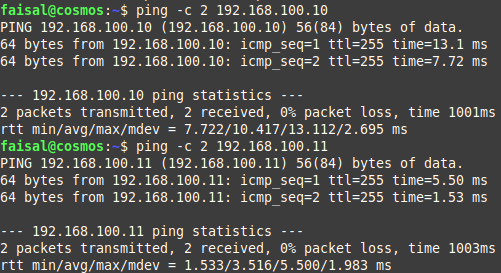
In my network topology, I have two Cisco Routers in which SSH is enabled, and they are reachable from my laptop, which means that I can test the connectivity by pinging them or I can SSH into them to perform any management tasks. The ping response is attached for both routers.
Many manual network administration tasks can be automated using Paramiko. And I’m going to automate the configuration backup of both routers in the network.
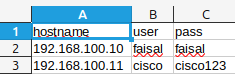
As I have been working on it from last couple of days, First of all, I just automated to read the router’s ip address, username and password from a file to login into first router and backup it’s current configuration and then login into second router to backup it’s current configuration. I had only two routers in the network, So, performing task on one router first and then on second router was not a problem, but if I had hundred of routers then it is going to be a really slow. Screenshot of the file is attached which was used to read details of router.
In the second iteration of writing the program for automating the same task, I used Multithreading to simultaneously login into both routers at the same time and backup the configuration of both routers. Now, Even if I had many routers in my network, it is going to be really fast to backup configuration of all those routers.
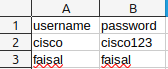
In the third iteration of writing the program for automating the same task, I improved the code by separating the IP Address data file and Credentials file, because I just thought what if I have many routers in my environment and the username and password of those routers are not constant, but different like a situation where one router can be authenticated using different credentials and another router needs different credentials for authentication. So, I created a file where I dumped all usernames and passwords into a file, and now my program can try to authenticate first router using one set of username and password but if it fails then it can automatically attempt to use next available username and password and keep trying until it authenticates. The screenshot of credential file is attached,
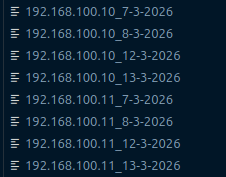
As I was working on it from many days, Here is a screenshot of all backup files from different days.
That’s all for today…
My Network Automation Journey with Paramiko
Written on
14-03-2026,
updated on
14-03-2026.
Previous:
Network Automation